Your Free 3D Kitchen Design: What You Get
By the JDI Construction teamReviewed by Arthur Kulchitskiy, Project ConsultantUpdated October 20264 min read
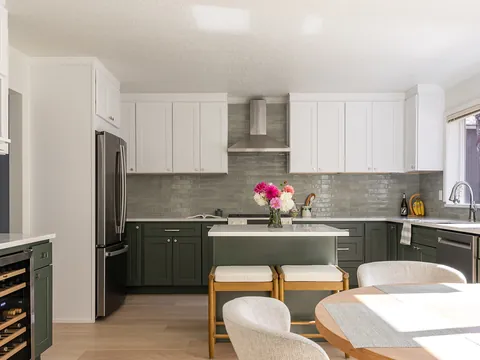
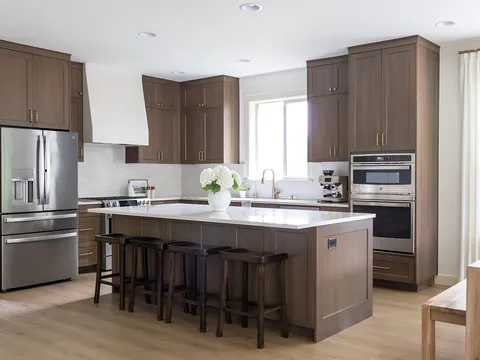
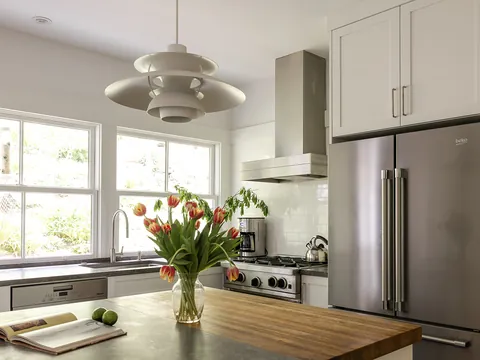
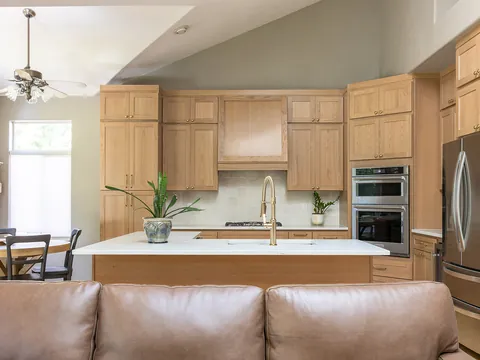
JDI Construction provides 3D renderings of your proposed kitchen at no charge when you schedule a bid. The renderings show the layout, cabinets, island, appliances and finishes in your actual room, so you can judge clearances, sightlines and the overall look before signing anything. Final colors should still be checked against physical samples.
A free 3D design is part of how JDI Construction starts a kitchen project. This page explains what you get, when it is free, what a 3D rendering is good for, what it cannot tell you, and how to review one so it saves you money instead of just looking nice.
What JDI includes, and when it is free
When you schedule a bid with JDI Construction, you get 3D renderings of your proposed kitchen at no charge, along with a written, line-item estimate. You do not have to sign a contract first. The renderings are built for your room, with your measurements and the layout and finishes discussed at the consultation.
If you go ahead, the design phase that follows a signed design agreement takes the design further: layout plans, design options, finish selections, visits to partner showrooms, mood boards and more 3D renders as the choices are made. Ask about the terms of the design agreement at the consultation so you know what the next step involves before you take it.
What a 3D rendering shows well
A floor plan shows where things go. A rendering shows what it will be like to stand in the room. That makes it the most useful tool for decisions that are hard to judge on paper:
- Layout and flow. Where the sink, cooktop and refrigerator sit relative to each other, and whether two people can work at once. Our guide to kitchen layouts gives the planning distances to check.
- Island size and clearances. Whether an island fits with room to walk and open the dishwasher and oven. See kitchen islands.
- Cabinet arrangement. Upper cabinet heights, open shelving, a pantry wall, and how door styles look across the whole room. See cabinet door styles.
- Appliance surrounds. How far a refrigerator stands out from the cabinets, and where the hood sits. See counter-depth vs. standard-depth refrigerators.
- Balance of materials. How much light and dark there is, and whether two-tone cabinets or a bold backsplash overwhelm the room.
What a rendering cannot tell you
A 3D design is a picture of intent. Keep these limits in mind:
- Exact color and texture. Screens shift color, and stone with movement will not match a rendered pattern vein for vein. Final choices come from physical samples.
- What is behind the walls. A rendering cannot show whether a wall is load-bearing, where the drain runs or whether the electrical panel has capacity. Those are checked in person; see opening a wall.
- Code compliance. Receptacle spacing, ventilation and clearances are design and inspection questions, not rendering questions. See kitchen building codes.
- A price. The estimate is the price. The rendering shows what the estimate describes.
How to review your 3D design
Most of the value comes from reviewing the design carefully before anything is ordered. Changes in a rendering cost nothing. Changes after the cabinet order cost time and money.
- Walk the room in your head. Picture making breakfast: where you put the groceries down, where the trash is, which way the dishwasher door opens.
- Check every door and drawer. Corner cabinets, appliance doors and drawers near each other can collide. Ask to see them open.
- Measure from your own floor. Use painter's tape to mark the island on your existing floor and stand around it.
- Check the views. Look at the kitchen from the entry and the living area, not just from the front.
- Write down every change at once. One complete list is faster to revise than several partial ones.
- Compare it with the estimate. Every item you see should appear in the line-item estimate, and every allowance should match what the rendering shows.
Our page on comparing kitchen remodel estimates explains allowances and how to read a line-item estimate.
Questions to ask about the 3D design
Every company means something a little different by "3D design". At the consultation, ask:
- Which views will I see: the whole room, each wall, the island from the seating side?
- Can I see an alternative layout or a second cabinet color?
- How are changes handled once I have reviewed the first renderings?
- Will the renderings show the specific cabinet door, countertop and backsplash we discussed, or a stand-in?
- What happens next if I want to go ahead, and what does the design agreement cover?
Clear answers at the start avoid surprises later. The broader list of questions to ask a kitchen contractor covers credentials, schedule and money.
Getting the most from the consultation
The renderings are only as good as what goes into them. Bring photos of kitchens you like and notes on what bothers you about the current one. Say who cooks, how many people use the kitchen at once, and what you want to store. If you want to compare two layouts or two cabinet colors, ask before the renderings are made. The guide to what to expect at a consultation lists what to prepare.
Where the 3D design fits in the project
The free renderings come at the start, with the bid. The design phase refines them as selections are made. By the time materials are ordered, the design should show exactly what will be built. The page on what a JDI kitchen remodel looks like shows where each step falls and how long construction takes at each remodel level.
To see your own kitchen in 3D, schedule a free consultation and bid, or read about kitchen remodeling in Vancouver first.
Common questions
Do I have to sign anything to get the free 3D design?
No contract is needed. The 3D renderings are free when you schedule a bid with JDI Construction. If you go ahead, the design phase that follows a signed design agreement develops the design further, with layout plans, finish selections, showroom visits and more renders.
Is a 3D rendering the same as plans for a permit?
No. A rendering shows how the kitchen will look. A permit application needs plans that show the work the permit office regulates, such as walls, plumbing and electrical. When your project needs a permit, JDI prepares what the permit requires and pulls the permit for you.
Can I see more than one layout?
Ask for it at the consultation. Comparing two layouts side by side, such as an island against a peninsula, is one of the most useful things a 3D design can do. Say which alternatives you want to see before the renderings are made.
Will the colors in the rendering match the real kitchen?
Close, but not exactly. Screens, room light and the rendering software all shift color. Use the rendering for layout, proportion and the balance between light and dark surfaces, and choose final colors from physical samples in your own kitchen at different times of day.
What kitchen clients say
JDI did a great job remodeling our rental house that needed a lot of work. They put in new floors, completely redid the kitchen and bathrooms. They also painted the entire interior. We had great communication and everything turned out fantastic.
Todd W. · Google review, Mar 15, 2026
This is our second time working with JDI... they do exceptional work and even more they stand begind the work they do which is getting rare these days. Looking forward to doing a Kitchen Remodel with them next, thanks again!
Anthony G. · Google review, May 13, 2026
The shower is stunning. I feel like I am in a spa. The new countertops and backsplash in the kitchen are beautiful. Art was great at keeping me informed every step of the project. The crew was so hard working and each was a perfectionist in what they did.
Virgil G. · Google review, Jan 7, 2026
Keep going
- JDI ConstructionRequest a free consultationAn in-home visit, an itemized plan and a 3D design layout.
- JDI ConstructionCurrent offersSeasonal specials on kitchen and bath remodels.
- Ready to hire · Hiring and getting startedWhat to Expect at a Kitchen Remodel ConsultationWhat happens at a kitchen remodel consultation: how to prepare, what gets measured and discussed, what you should receive afterward, and what to ask.
- JDI ConstructionKitchen remodeling in Vancouver, WAOur kitchen remodeling service, recent projects and what to expect.